



Back in 2013, when I first heard about Google Tag Manager (GTM), I didn’t understand why we’d need it at all. I was convinced that Google Analytics (GA) is all I will ever need. But the questions kept coming back – what is Google Tag Manager? What is the difference between Google Analytics and Google Tag Manager? Cut to the present date, I now know these were never competing against one another. Instead, they go hand-in-hand in modern marketing. However, this confusion of Google Analytics vs Google Tag Manager is still there among beginners, and rightly so. In this article, I will discuss what each means, how they are different and yet complement each other, and when to use what.
Also read: What is Google Tag Assistant and How to Implement it?
Let’s get started.
GA and GTM both have tags and tracking in them, but they serve very different purposes. For marketers, every click and scroll matters. So, having the right setup for tracking is extremely crucial. Add to this the growing privacy regulations and cookie limitations, marketers and analysts can no longer afford to rely on guesswork. It is almost a mandate to understand how GA and GTM work – both individually and together – to collect accurate, compliant, and useful data. So, let’s understand which tool handles data tracking, which handles tag deployment, and how to combine both for reliable insights.
What is Google Analytics (GA)?
Google Analytics (GA) is a web analytics platform designed to help you understand how people interact with your website or app. It collects, processes, and reports data about user activity – from where visitors come from to what actions they take once they arrive. In short, GA tells you who your audience is, how they found you, and what they do on your site.

How does it work?
When a user visits your website, a small piece of tracking code records details about their interaction, such as the pages they view, how long they stay, and the device they’re using. This information is sent to your Google Analytics property, where it’s processed and displayed in reports. You can then use these insights to track performance, understand user behavior, and make informed marketing decisions.
For example, a marketer might use GA to see which ad campaigns bring users who spend more time on-site or complete a purchase, helping allocate budget toward the most effective channels.
Some of GA’s core functions include:
- Tracking traffic, users, and sessions to monitor website health
- Measuring engagement and conversions, such as sign-ups or purchases
- Building audiences for remarketing or personalization
- Analyzing which channels drive the most valuable visitors
At present, Google Analytics 4 (GA4) has replaced Universal Analytics as the default version. GA4 is designed for a privacy-first world, focusing on events instead of pageviews and integrating better with apps and cross-device tracking.
What is Google Tag Manager (GTM)?
Google Tag Manager (GTM) is a tag management system that lets you control and deploy tracking codes, known as tags, on your website or app without manually editing the code each time. Instead of asking a developer to add new scripts for every marketing or analytics update, you can manage everything from a single, user-friendly dashboard.

How does it work?
GTM uses three main building blocks: tags, triggers, and variables.
- Tags are snippets of code that send information to platforms like Google Analytics, Google Ads, or Meta Pixel.
- Triggers define when those tags should fire — for example, when someone clicks a “Buy Now” button or submits a form.
- Variables are the details that help tags and triggers work correctly, such as button text, page URLs, or event names.
For instance, if you want to track every time a visitor clicks “Buy Now,” you can create a trigger for that button, attach it to a GA4 event tag, and let GTM send the data automatically without changing your website’s source code.
GTM’s core functions include:
- Managing multiple tracking tags for different platforms in one place
- Simplifying implementation for marketers without needing developer support
- Offering built-in preview, debugging, and version control tools for safe testing
Google Analytics vs Google Tag Manager: When Do You Need GTM?
Google Analytics tracks user interactions using the tracking code, which is also known as the GA JavaScript code snippet. These snippets must be placed on every page of your website. GA answers questions like:
- How many people visited your website the day before yesterday?
- How many pages did they view per session?
- How long was each session?
- How many visitors bounced off your website without performing any action?
- Which landing page was the most popular?
As soon as an interaction like a pageview happens, a JavaScript snippet sends the corresponding data to GA. This comes in handy when you want to track general user behaviour like bounce rate, session duration, referrals, etc.
Let’s say you want to understand how many people in specific have used a particular feature on your website or app. This is where GA might not be of great help. You will need custom tags, i.e., Google Analytics Events, that will send data only when a visitor completes a particular custom action on your website or app. For instance, here it can be submitting a form to sign up for a demo on a particular feature page.
One way would be to add that form submission tracking tag to the website. But that might complicate things if you are looking to track tens and thousands of such interactions on GA. I am not saying it is impossible on GA. You can do the tracking, but it will take you months to get your marketing tags up and running. That’s a major slowdown!
What do you need? Google Tag Manager from Google lets you deploy various types of code (tags) to your website, like Google Analytics event codes, Google Ads conversion script, etc. There are so many such codes that you can add to your website using GTM, including custom codes.
Now, you don’t need to nudge your developer to create tracking code for each singular event. GTM is your central system that lets you control everything from one place, deciding what data to send to analytics and when.
Important to note: GTM is not a replacement for GA. Instead, consider GTM as an additional help that lets users add GA tracking code to the website easily, deploy GA event codes, and define rules of when each code will be fired.
GA vs GTM: Key Differences
Google Analytics is a data analysis tool. It collects, organizes, and reports data about how users interact with your website or app. Its purpose is to help you understand what’s happening on your site, like who’s visiting, how they got there, what they’re doing, and whether they’re converting. GA provides the insights that inform your business decisions.
Google Tag Manager, on the other hand, is a tag deployment and management tool. It doesn’t collect or store data by itself. Instead, it acts as a middle layer that controls when and how various tracking tags (including the GA tracking code) are fired. GTM’s main purpose is to make the process of adding or updating tags simpler, faster, and less reliant on developers.
Here’s a simple way to think about it:
- GTM is the hands that implement the tracking instructions.
- GA is the brain that analyzes the data and draws insights.
For example, when you want to measure how many users click your “Contact Us” button, GTM helps you deploy a tag that sends click data to Google Analytics. GA then receives and reports that data, so you can analyze how well your call-to-action is performing.
Many marketers assume that using GTM means they no longer need GA, but that’s a misconception. GTM doesn’t replace GA; it facilitates better data collection for GA (and other platforms). You still need Analytics to interpret the information and turn it into meaningful insights.
In short, GTM manages how and when data is sent, while GA manages what happens to that data once it arrives.
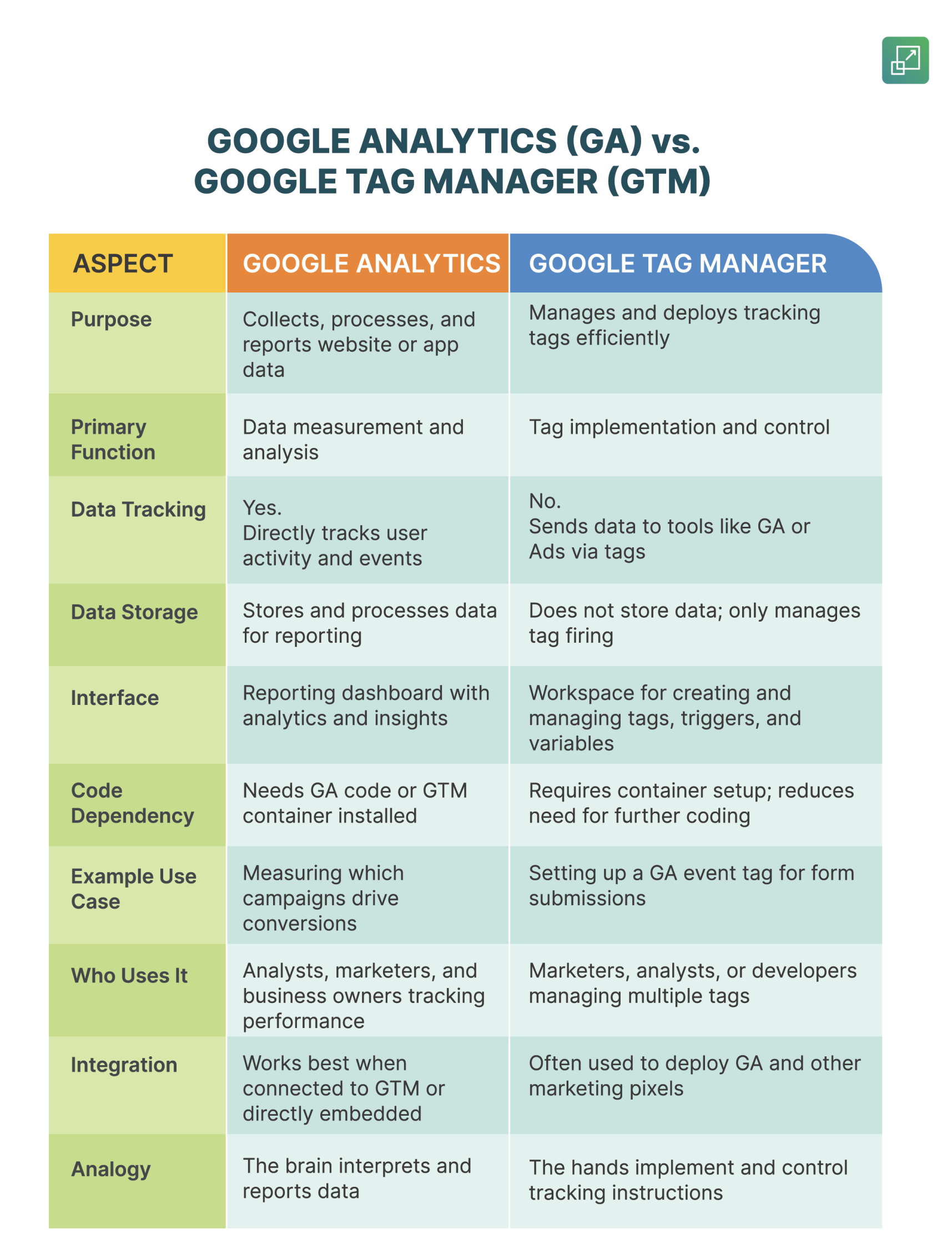
In essence, Google Analytics tells you what’s happening on your site, while Google Tag Manager ensures that the right data is being sent there in the first place. When used together, they create a powerful, flexible, and accurate tracking ecosystem.
How Google Analytics and Google Tag Manager Work Together?
Google Analytics and Google Tag Manager are often used together to create a flexible and efficient tracking setup. While Google Analytics (GA) focuses on collecting and reporting data, Google Tag Manager (GTM) focuses on managing and deploying the tracking tags that send data to GA.
Think of GTM as the delivery system and GA as the recipient. GTM fires the right tags at the right time, and GA receives that data to turn it into actionable reports and insights. This partnership eliminates the need for hard-coded tracking snippets scattered across your website, keeping your setup cleaner, easier to maintain, and less error-prone.
How To Set Up a GA Tag Inside GTM?
In a modern setup, the Google Analytics tracking code (for GA4) is implemented inside Google Tag Manager instead of being placed directly in the website’s code. Here’s how that works step by step:
1. Add your GA4 configuration tag in GTM
- Go to your GTM workspace → Add a New Tag → Tag Type: Google Analytics: GA4 Configuration.
- Enter your Measurement ID (e.g.,
G-XXXXXXXXXX) from your GA4 property. - Set the trigger to “All Pages” so the tag fires whenever someone visits any page on your website.
// Example GA4 tag structure (automatically handled by GTM)

gtag('config', 'G-XXXXXXXXXX', {

'send_page_view': true

});
GTM will inject this code dynamically, so you don’t have to paste it manually on each page.
2. Define event triggers for key user actions
You can track custom interactions like form submissions, video plays, or “Add to Cart” clicks.
- In GTM, create a new trigger for a specific event (e.g., “Click – Button”).
- Then, create a GA4 Event Tag that sends this interaction data to Google Analytics.
Example event tag in GTM:
// Example: Track "Add to Cart" button clicksWhen a visitor clicks the “Add to Cart” button, GTM’s trigger fires this tag, and GA4 records the event instantly.
gtag('event', 'add_to_cart', {
'item_name': 'Running Shoes',
'value': 79.99,
'currency': 'USD'
});
3. Preview and Debug
GTM offers a built-in Preview Mode that lets you test tags before publishing. You can confirm that each tag fires correctly, view the data layer, and ensure that no duplicate events are being sent.
4. Publish Changes
Once you’re confident everything works, you can publish the container. GTM then handles all future tracking instructions automatically without needing to edit your website code.
Example: Tracking an “Add to Cart” Event
Let’s say you want to know how many users have added a product to their cart.
- Without GTM: You will need a developer to manually add JavaScript tracking code to the “Add to Cart” button.
- With GTM:
- Create a Click Trigger that listens for “Add to Cart” button clicks.
- Set up a GA4 Event Tag named “add_to_cart” in GTM.
- Link the tag to the trigger.
- Preview, test, and publish.
Now, every time someone clicks the button, GTM automatically sends the event data to GA4, where it appears under “Events” in your Analytics dashboard.
Benefits of Integrating GA with GTM
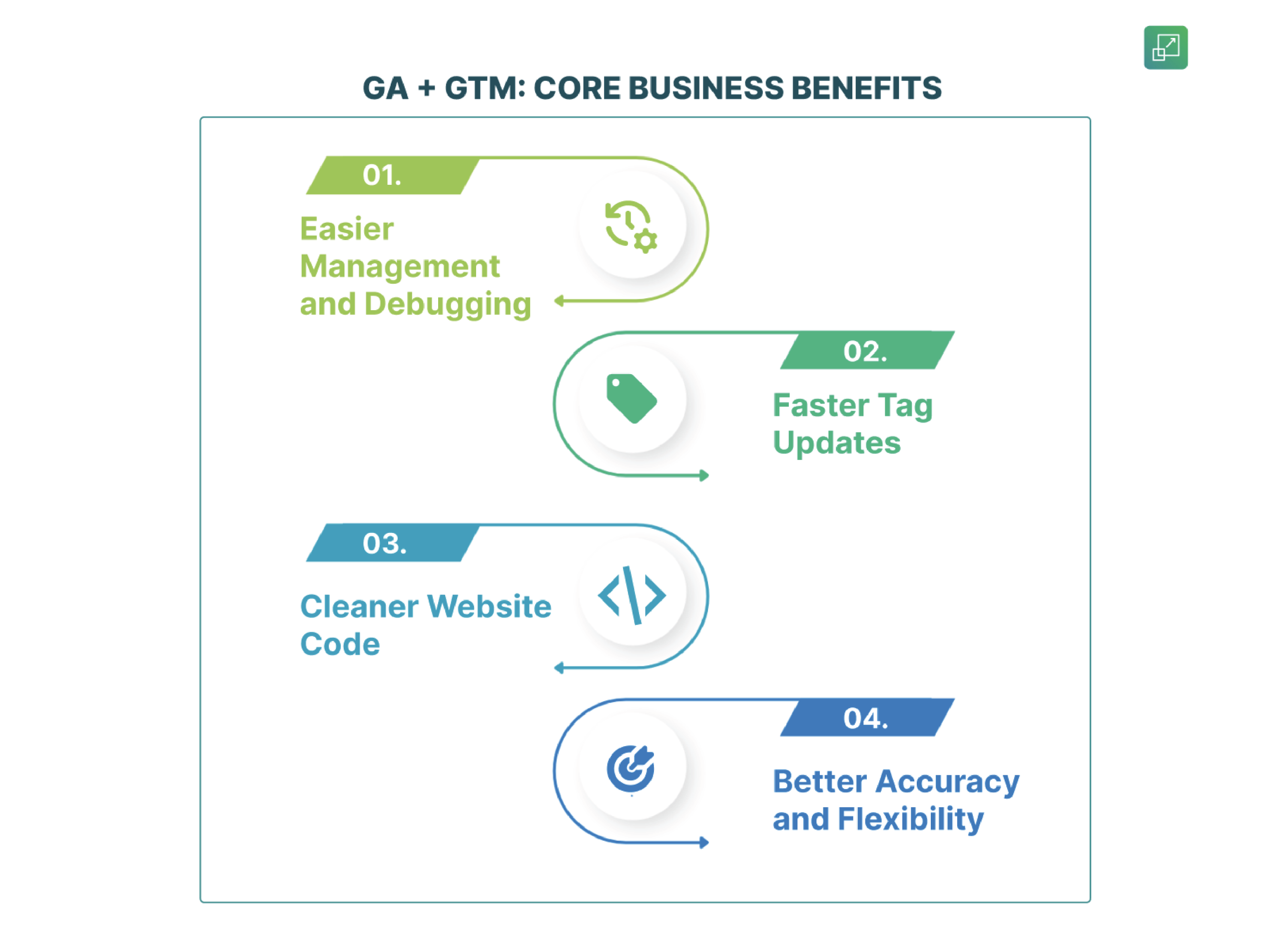
- Easier Management and Debugging
GTM’s preview and version control features make it simple to test and troubleshoot tracking setups. You can update tags anytime; no developer intervention needed.
- Faster Tag Updates
Want to track a new button click or add a marketing pixel? You can do it from the GTM dashboard without waiting for a code deployment cycle.
- Cleaner Website Code
Instead of having multiple hard-coded tracking scripts across your site, GTM consolidates all tracking into a single container snippet, improving performance and maintainability.
- Better Accuracy and Flexibility
GTM ensures consistent tag firing rules and minimizes human error. It also makes it easy to manage multiple platforms such as Google Ads, Meta Pixel, LinkedIn Insight Tag — alongside Analytics.
When used together, Google Tag Manager and Google Analytics create a smooth, scalable tracking setup. GTM handles the deployment logic (the how and when of data collection) while GA focuses on what the data means. This integration helps marketers adapt quickly, measure accurately, and gain deeper insights without relying on heavy development cycles.
Google Analytics and Google Tag Manager: When to Use Each?
Knowing when to use each or, more importantly, when to use both together, helps you create a data setup that’s accurate, scalable, and easy to manage.
When to use Google Analytics?
Use Google Analytics when your main goal is to measure performance, engagement, and conversions on your website or app. GA is your reporting hub. It helps you interpret what’s happening and why.
You should rely on GA when you want to:
- Measure key metrics: Track sessions, users, bounce rate, and engagement time to understand how visitors interact with your content.
- Analyze conversions: Monitor form submissions, purchases, or other goal completions to see what’s driving results.
- Understand traffic sources: Identify which marketing channels — organic search, paid ads, social media, or email — bring the most valuable visitors.
- Evaluate ROI: Tie campaign data back to business outcomes to determine where to invest more.
For instance, a marketing manager might use Google Analytics to discover that visitors from paid search campaigns spend 30% more time on the site and convert at a higher rate than those from social media. This insight helps refine ad budgets and content strategy.
In short, GA is your measurement and decision-making tool. It helps you interpret data and turn it into business intelligence.
When to use Google Tag Manager?
Use Google Tag Manager when you need to control and deploy multiple marketing or analytics tags quickly without constantly editing your website code. GTM acts as a central command center where you can manage tracking tags for Google Analytics, Google Ads, Meta Pixel, LinkedIn Insight Tag, and more.
You should rely on GTM when you want to:
- Manage multiple tracking platforms: Instead of manually placing dozens of code snippets, you can control all tags from one GTM container.
- Create dynamic event tracking: Set up triggers for clicks, form submissions, or scroll depth — and send those events to Analytics or other tools.
- Reduce developer dependency: Once GTM is installed, marketers can add or update tags through its visual interface, without needing to touch the website code.
- Test and troubleshoot easily: GTM’s Preview Mode lets you validate tags before publishing, helping avoid duplicate or broken tracking.
For example, suppose you’re launching a new campaign and want to track video plays, button clicks, and purchases. Instead of adding code snippets manually, you can configure all these interactions in GTM and send the data to Google Analytics and Google Ads simultaneously.
In short, GTM is your implementation and control tool. It helps you manage how and when data gets collected.
When to use both GA and GTM?
The real power comes when you use Google Analytics and Google Tag Manager together. GTM handles the deployment of tags, and GA handles the reporting and analysis of the resulting data.
Here’s how they complement each other:
- GTM manages GA tags: You place your GA4 configuration tag inside GTM.
- GTM defines triggers: For example, firing an event when someone clicks “Add to Cart.”
- GA collects and reports that event data so you can analyze performance and user behavior.
This integration offers several benefits:
- Efficiency: Update tags or add new tracking events instantly, without waiting for code releases.
- Accuracy: Centralized tag management minimizes the risk of inconsistent tracking.
- Scalability: Easily integrate other platforms (like Ads, Meta, or Hotjar) alongside GA.
For example, if a marketer wants to measure how many users start but don’t complete a form, GTM can track both the “Form Start” and “Form Submit” events and send them to GA4. In GA, you can then view drop-off rates and identify where users abandon the process.
Together, GA and GTM give marketers full visibility and control over their digital performance.
Common Misconceptions around GA and GTM
Because both tools deal with tracking and data, it’s easy to misunderstand how Google Analytics and Google Tag Manager work, and how they differ. Here are a few common misconceptions that often confuse:
-
“I don’t need GTM if I have GA.”
False. They serve entirely different roles. GA analyzes and reports data, while GTM manages the tags that send data to GA. Using both together ensures you’re collecting and reporting the right information efficiently. -
“GTM tracks everything automatically.”
Also false. GTM doesn’t track anything by itself — it needs to be configured. You must set up tags, triggers, and variables to define what data should be sent and when. -
“Switching to GTM means replacing GA.”
Again, false. GTM is a facilitator, not a substitute. It helps implement GA and other marketing tools, making your setup cleaner and easier to manage.
A simple way to remember this is through a metaphor:
If your website is a restaurant, Google Tag Manager is the waiter taking orders (sending instructions), and Google Analytics is the chef preparing and presenting the final report. They work best when they collaborate.
Concluding Thoughts
Google Analytics and Google Tag Manager are two sides of the same coin. GA is the tool that analyzes and reports user data, while GTM manages the mechanism that sends that data in the first place. One interprets; the other implements.
They’re not competing tools. They’re complementary partners that work best together. GTM simplifies tag deployment and ensures accurate tracking, while GA turns that data into insights you can act on. When used together, they give marketers the clarity, control, and agility needed to make smarter, data-driven decisions.
Have you started using GA and GTM? DM us and we can help you unlock the real power for your brand.
FAQs: GA vs. GTM
1. Can I use Google Tag Manager without Google Analytics?
Yes, you can. Google Tag Manager isn’t limited to Google Analytics — it can deploy tags for many platforms like Google Ads, Meta Pixel, LinkedIn Insight Tag, and more. However, GTM doesn’t collect or report data on its own. You’ll still need a tool like GA or another analytics platform to process and visualize the information it sends.
2. Is GTM required for GA4?
No, GTM isn’t required to use GA4. You can install the GA4 tracking code directly on your website. However, using GTM makes implementation much easier. It allows you to add, edit, and test GA4 tags without touching your website code, a major advantage for marketers managing multiple events or campaigns.
3. Does GTM affect site performance?
When implemented properly, GTM has minimal impact on site performance. In fact, it can improve efficiency by reducing the number of hard-coded scripts on your site. All tracking codes are managed from a single container, leading to cleaner code and easier maintenance.



Comments
This is a real gem! While GTM is clearly the cool new admin panel allowing marketers to be hands-on, GA remains the wise old brain soaking up all the data. Honestly, imagine trying to explain marketing without them – itd be like trying to navigate a maze blindfolded while someone keeps rearranging the walls! GTMs no developer needed tag is my personal favorite – its like giving a remote control to someone who just wants to *look* cool, not actually watch the show. Kudos for clarifying this powerful duo!
HA! So GTM is the cool admin panel while GA is the dusty report card that just says Ask Mark under everything. Honestly, GTM feels like the smart friend who sets everything up so the boss (GA) can just coast and look smart. Love how the article says dont nudge your developer – GTMs the new developer, just less caffeinated! GTM manages the how and GA tells the what now?, which is perfect because GTM would rather play video games all day than do the actual work. Kidding! Mostly. This is great for marketers who want to feel powerful without actually coding. Just point and click – unless something goes wrong, then GTM is just that weird kid in the corner who knows *exactly* where all the extra screws are.